
Cashew—Expense Budget Tracker
Dapper App DeveloperFinance
4.7672.00 Reviews
- Version
- 6.6.11
- Installs
- 500.00K
- Age Rating
- Everyone
Screenshots

Our Review of Cashew—Expense Budget Tracker
 Analysis by Appyee
I like personal finance tools best when they make it easier to notice a habit, not when they bury me in charts. Cashew—Expense Budget Tracker is aimed at that everyday job: keeping track of spending and making a budget feel manageable. It is a free finance app from Dapper App Developer, and its straightforward purpose makes it worth considering if you want a clearer picture of where your money goes. I’d approach it as a practical organizer rather than a substitute for financial advice or a guarantee that every transaction will be handled automatically.
How Cashew fits into everyday money management
The current Android release is version 5.4.4, and the app has been available since August 21, 2023. Its 4.8 average from around 23,000 ratings, alongside over 500,000 installs, suggests that many people have found it useful, though popularity alone can’t tell you whether its workflow suits your finances. It is rated for Everyone, with optional in-app purchases ranging from $1.49 to $19.99 per item. I’d start with the free experience and decide whether its routine fits before paying for anything.
The first decision is how much detail you want to maintain. A budget can be useful even when it has only a few broad categories; making dozens of categories before you have a tracking habit can turn setup into a chore. I’d begin with the areas where spending tends to drift, then add detail only when a broad total leaves an important question unanswered. That keeps the app’s information tied to decisions you can actually make.
First Impressions and Setup
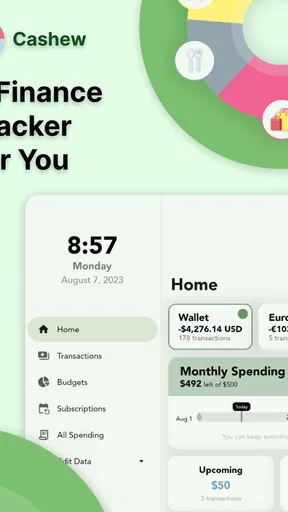
Right off the bat, Cashew—Expense Budget Tracker gives you a clean and simple interface that’s super inviting. No overwhelming charts or data dumps here. The setup was a breeze; all I had to do was sync my bank accounts, and the app took care of the rest. The onboarding process is intuitive, with step-by-step guidance that even the most tech-challenged among us can follow.
For a more reliable start, I’d check the first transactions and category assignments rather than assuming the initial picture is perfect. A quick review early on can catch a repeated misclassification before it distorts a monthly total. If your spending comes from several places or includes cash, consistency matters more than a perfectly elaborate setup: choose a routine you can maintain and revisit the entries you care about most.
Tracking Expenses Made Easy
Once you're all set up, the app starts working its magic. It automatically categorizes your expenses, so you can see exactly where your money is going. Groceries, dining out, entertainment—you name it, Cashew tracks it. The categorization is surprisingly accurate, and if it does make a mistake, you can easily adjust it. I loved how it gave me a clear picture of my spending habits without any manual input.
Automatic categorization is most useful as a first pass, not as a reason to stop checking. A purchase that could reasonably belong in more than one category may need your judgment, and one corrected transaction can matter if you use category totals to make a decision. I’d review unusual or high-impact entries first, then leave routine items alone once the pattern looks sensible. This is a good trade-off for people who want less manual bookkeeping without expecting a budget app to understand every purchase perfectly.
For example, imagine you are trying to keep weeknight meals from quietly becoming a large part of the month’s spending. A glance at the relevant category can prompt a useful question: was the total driven by a few planned dinners, or by frequent small purchases? The app can help make that pattern visible; you still decide whether it calls for a change. That distinction is important. Tracking is a way to see what happened, while budgeting is where you choose what to do next.
Budgeting Like a Pro
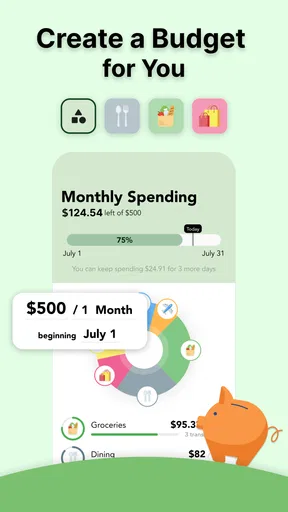
Now, onto the budgeting feature. Setting up a budget is as easy as pie. You can create monthly budgets for different categories and track your progress in real-time. The app sends you reminders if you’re getting close to your limit, which is a gentle nudge to curb any impulse buys. I found this feature incredibly useful for keeping me accountable, especially in categories where I tend to overspend.
I’d treat a category limit as a prompt to pause, not a rule that every month must follow exactly. Some costs are irregular, and a month with a one-off expense can make a normal budget look misleading. When that happens, it helps to distinguish a genuine change in your routine from an exceptional purchase instead of reacting to the alert alone. The reminder is most useful when you have already decided what the limit is meant to protect—for example, saving room for bills or reducing unplanned takeout.
Cashew is likely a better fit for someone who wants a hands-on view of everyday categories than for someone who only checks a bank balance once in a while. If you share household spending, you may also need to agree on how purchases are recorded and reviewed; an app can display activity, but it cannot settle different expectations about what counts as discretionary. For a simple personal budget, a few focused limits are easier to maintain than trying to account for every possible scenario from day one.
Insights and Reports
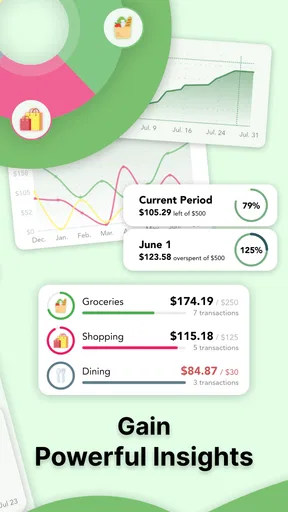
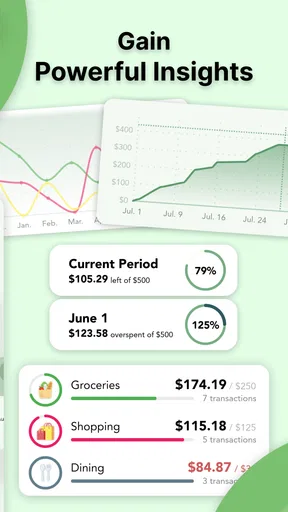
One of the coolest parts of using Cashew is the insights and reports it generates. With just a few taps, you can see detailed reports of your spending patterns. The visual graphs and charts are not only aesthetically pleasing but also super informative. They helped me identify areas where I could cut back and save more. It’s like having a personal financial advisor in your pocket.
I’d use reports to compare questions, not just to browse attractive visuals. For instance, if a category seems high, check whether the total reflects a recurring habit or a small number of unusual purchases before cutting back. Looking at the same categories consistently makes the comparison more meaningful than changing your setup every month. The practical benefit is not the chart itself; it is having enough context to make one specific adjustment and then see whether it helped.
This is also where an expense tracker differs from a spreadsheet or a notes app. A spreadsheet can be shaped around almost any personal method, but it depends on you building and maintaining that method. A simple notes list is quick but makes patterns harder to compare. Cashew’s appeal is the combination of tracking, budgets, and reports in one place; the trade-off is that you need to accept its way of organizing information and keep an eye on how transactions are categorized.
Security and Privacy
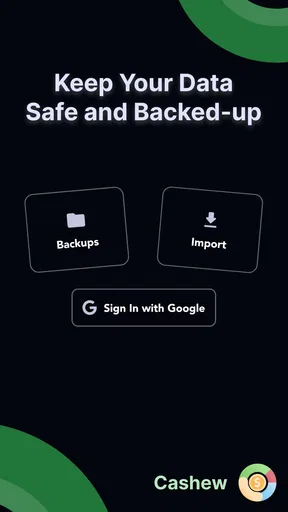
Let’s talk about something important—security. Cashew uses bank-level encryption to ensure your financial data is safe and sound. Plus, you can set up a passcode or use biometric login for an extra layer of protection. As someone who values privacy, this gave me peace of mind knowing my information isn’t going to be compromised.
Even with those protections, I’d make a deliberate choice about what information I put into any finance app and secure the device itself. A passcode or biometric lock can help protect access when someone else handles your phone, while careful review of account connections is sensible whenever you use a tool that links to financial activity. For readers who prefer not to connect accounts, a manual tracking approach may feel more comfortable, although it usually asks for more regular effort.
User Experience and Support
Aside from its features, Cashew offers a pleasant user experience. The app is fast, responsive, and doesn’t crash—something I can’t say for every app out there. If you ever run into issues or have questions, their customer support is top-notch. I reached out with a query and got a helpful response within hours, which is always a plus in my book.
That kind of smoothness matters because expense tracking succeeds or fails on repetition. If recording or reviewing spending feels like a separate project, it is easy to stop doing it when life gets busy. I’d build the app into a routine that already exists, such as checking the budget when reviewing the week’s plans, rather than waiting until the end of the month to reconstruct what happened. A brief, regular check is more useful than an occasional deep dive that feels like catching up on paperwork.
There are still reasons someone might prefer another approach. If your main need is a highly customized ledger, a spreadsheet may offer more control. If you want to avoid maintaining categories or reviewing spending, a basic banking app may be enough for checking balances, even if it gives less of a budgeting routine. And if you expect a tracker to make spending decisions for you, Cashew is not a replacement for that judgment. Its value depends on whether you’ll use the information it organizes.
What to keep in mind as you use it
With a current version of 5.4.4, I’d judge the app by the workflow available now rather than assume that future changes will add a particular feature. The release history is a reason to treat it as an actively presented product, not evidence by itself that every rough edge has been resolved. Existing users should keep their own categories and habits under review when changing how they budget; a new app version does not automatically make an old budget useful.
For someone deciding whether to try it, the key questions are practical: do you want category-level visibility, are you willing to check occasional classification choices, and would reminders help you stay aware of a limit? If the answers are yes, the free starting point lowers the commitment. If you need a tool built around extensive customization, or strongly prefer not to connect financial accounts, consider whether a manual system better matches your comfort level before adopting a new routine.
I’d also avoid setting expectations around a single month. A tracker becomes more informative as you build a consistent record, while one unusual week can distort your impression of a category. Start with a small number of budgets, check the entries that could change your decisions, and adjust only after you see a pattern. That approach makes the reports easier to interpret and helps keep budgeting from becoming another source of stress.
Final Thoughts
To wrap it up, Cashew—Expense Budget Tracker is a fantastic tool for anyone looking to take control of their finances. It’s user-friendly, packed with useful features, and backed by solid security measures. Whether you’re a budgeting newbie or a seasoned pro, this app can help you stay on top of your financial game. So why not give it a try and see how it can transform your spending habits? Trust me, your wallet will thank you!
My recommendation is strongest for people who want a clear, repeatable way to notice where everyday spending is going and are comfortable making occasional corrections. I would start simply, give the routine time to settle, and use the budget prompts as reminders rather than verdicts. If that sounds like the sort of support you want from a finance app, Cashew is worth trying; if you need full control over every detail or prefer not to track categories, a different method may suit you better.
Verdict
Strengths of Cashew—Expense Budget Tracker
- User-friendly interface, easy navigation.
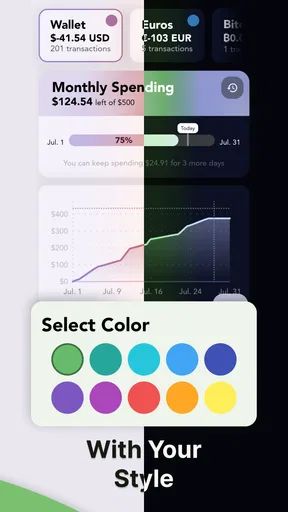
- Customizable budget categories.
- Real-time expense tracking.
- Syncs across multiple devices.
- Secure data encryption.
Limitations of Cashew—Expense Budget Tracker
- Limited free version features.
- No direct bank integration.
- Occasional sync delays.
- No dark mode option.
- Requires internet for full functionality.
Similar Picks in This Category
View All
Google Wallet
Google LLC4.3

Airtel: Recharge, Bank & Loans
Airtel4.0

PayPal - Pay, Send, Save
PayPal Mobile4.2

DANA Indonesia Digital Wallet
PT Espay Debit Indonesia Koe4.5

Binance: Buy Bitcoin & Crypto
Binance Inc.4.8

Cash App
Block, Inc.4.7
Frequently Asked Questions
What features does Cashew—Expense Budget Tracker offer for managing finances?
Cashew—Expense Budget Tracker provides a comprehensive suite of features to help manage your finances efficiently. It includes tools for tracking expenses, setting budgets, and generating reports. Users can categorize expenses, set up recurring transactions, and even sync data across multiple devices. The app offers a user-friendly interface that makes financial management straightforward and accessible for everyone.
Is Cashew—Expense Budget Tracker available for both Android and iOS devices?
Yes, Cashew—Expense Budget Tracker is available on both Android and iOS platforms. You can download the app from the Google Play Store for Android devices and the Apple App Store for iOS devices. This cross-platform availability ensures that users can manage their finances seamlessly, regardless of their preferred device.
Does Cashew—Expense Budget Tracker require a subscription, or is it free to use?
Cashew—Expense Budget Tracker offers both free and premium versions. The free version includes basic features suitable for everyday use, while the premium version unlocks advanced tools such as detailed reporting and customizable categories. Users can choose the option that best fits their financial management needs and budget.
How secure is my financial data with Cashew—Expense Budget Tracker?
Cashew—Expense Budget Tracker prioritizes user security and employs robust measures to protect your financial data. The app uses encryption protocols to safeguard information and offers features such as PIN codes and biometric authentication for additional security. Users can be confident that their sensitive data remains private and secure.
Can I sync my data across multiple devices using Cashew—Expense Budget Tracker?
Yes, Cashew—Expense Budget Tracker allows users to sync their data across multiple devices. This feature ensures that your financial information is up-to-date and accessible wherever you go. Users can easily switch between devices without losing track of their expenses or budgets, making financial management more convenient.
